Showing posts with label hack. Show all posts

Tuesday, July 14, 2009

Download BlueTooth Hack application pack | Latest Tricks Cheats hacking tricks,

Today's post BlueTooth Hack application pack.lot of features of these application's.Once connected to a another phone via bluetooth you can:
1 read his messages 2 read his contacts- change profile 3 play his ringtone even if phone is on silent
4 play his songs(in his phone) 5 restart the phone 6 switch off the phone 7 restore factory settings
8 change ringing volume 9 And here comes the bestCall from his phone" it includes all call functions like hold etc.

link:

                                         http://www.ziddu.com/download/4149472/15BluetoothHackAppsOneEbook.rar.html

Download BlueTooth Hack application pack | Latest Tricks Cheats hacking tricks,

Today's post BlueTooth Hack application pack.lot of features of these application's.Once connected to a another phone via bluetooth you can:
1 read his messages 2 read his contacts- change profile 3 play his ringtone even if phone is on silent
4 play his songs(in his phone) 5 restart the phone 6 switch off the phone 7 restore factory settings
8 change ringing volume 9 And here comes the bestCall from his phone" it includes all call functions like hold etc.

link:

                                         http://www.ziddu.com/download/4149472/15BluetoothHackAppsOneEbook.rar.html

Monday, July 13, 2009

How To Disable Windows Genuine Advantage Notifications

*****************************************************
  1. Log on to the computer by using an account that has administrative permissions.
  2. Make sure that the WGA Notifications version that exists on the computer is a pilot version listed above. The version format for the pilot version is 1.5.0532.x. In this case, you can uninstall versions 527-532 only (Note: the steps should disable other version of WGA Notifications too). To find the WGA Notifications version, follow these steps:
    1. Click Start, and then click Control Panel.
    2. Double-click Add or uninstall Programs, locate and then click Windows Genuine Advantage Notifications, and then click Click here for support information.
    3. In the Support Info dialog box, verify the version number, and then click Close.
  3. Rename the following files by changing the extension to .old:

    Rename %Windir%\system32\WgaLogon.dll to %Windir%\system32\WgaLogon.old
    Rename %Windir%\system32\WgaTray.exe to %Windir%\system32\WgaTray.old

  4. Restart the computer.
*****************************************************

How To Disable Windows Genuine Advantage Notifications

*****************************************************
  1. Log on to the computer by using an account that has administrative permissions.
  2. Make sure that the WGA Notifications version that exists on the computer is a pilot version listed above. The version format for the pilot version is 1.5.0532.x. In this case, you can uninstall versions 527-532 only (Note: the steps should disable other version of WGA Notifications too). To find the WGA Notifications version, follow these steps:
    1. Click Start, and then click Control Panel.
    2. Double-click Add or uninstall Programs, locate and then click Windows Genuine Advantage Notifications, and then click Click here for support information.
    3. In the Support Info dialog box, verify the version number, and then click Close.
  3. Rename the following files by changing the extension to .old:

    Rename %Windir%\system32\WgaLogon.dll to %Windir%\system32\WgaLogon.old
    Rename %Windir%\system32\WgaTray.exe to %Windir%\system32\WgaTray.old

  4. Restart the computer.
*****************************************************

Access Restricted Sites And Internet From Lan Office School college!!! - Learn Cool Tricks , Tips, Tricks, Tweaks, Hacks,And A Lot More

**************************************************
How to access the protected and so called phished out sites in a college subnetwork or office subnetwork....ALso access the GTALK and Yahoo and any messenger and chatting softwares....?

lets say that ur behind a firewall in a lan subnet in which ur college school or office provides u internet but with restricted sites...that is u cant open any other site except those allowed....in my college we use a software to access sites out of restriction by a software named ultrasurf...its completely automatic and actually works....our college tried to stop us very vehemently but failed to restrict this software as its coding is just like vry hard to decrypt...anyways lets go!!!

Download a software from this site
....
http://www.wujie.net/downloads/ultrasurf/u.zip
(tested TROJAN FREE)
its called ultrasurf !!!
see how it works... u just have to extract the exe file outta zip file....then run the exe file...it will automatically detect ur network and router or proxy server...theere are 3 bars which will be flooded with connectivity indicators....now ur free to access anything.....just change ur browsers ip to 127.0.0.1 and port to 9666 and u can access anything....works for chat softwares too..like gtalk and yahoo////

our college had restricted our download limit to 1 mb...but using this we had been downloading one whole movie everyday.....with full speed of 136kbp/s ...since am in lan but can access internet as my college provides me so basically all i do gets recorded in college server logs...but using ultra doesn't even leaves a piece of log behind u.....
so start enjoying...this is my first post...
**************************************************


Access Restricted Sites And Internet From Lan Office School college!!! - Learn Cool Tricks , Tips, Tricks, Tweaks, Hacks,And A Lot More

**************************************************
How to access the protected and so called phished out sites in a college subnetwork or office subnetwork....ALso access the GTALK and Yahoo and any messenger and chatting softwares....?

lets say that ur behind a firewall in a lan subnet in which ur college school or office provides u internet but with restricted sites...that is u cant open any other site except those allowed....in my college we use a software to access sites out of restriction by a software named ultrasurf...its completely automatic and actually works....our college tried to stop us very vehemently but failed to restrict this software as its coding is just like vry hard to decrypt...anyways lets go!!!

Download a software from this site
....
http://www.wujie.net/downloads/ultrasurf/u.zip
(tested TROJAN FREE)
its called ultrasurf !!!
see how it works... u just have to extract the exe file outta zip file....then run the exe file...it will automatically detect ur network and router or proxy server...theere are 3 bars which will be flooded with connectivity indicators....now ur free to access anything.....just change ur browsers ip to 127.0.0.1 and port to 9666 and u can access anything....works for chat softwares too..like gtalk and yahoo////

our college had restricted our download limit to 1 mb...but using this we had been downloading one whole movie everyday.....with full speed of 136kbp/s ...since am in lan but can access internet as my college provides me so basically all i do gets recorded in college server logs...but using ultra doesn't even leaves a piece of log behind u.....
so start enjoying...this is my first post...
**************************************************


how to Make Your Folder invisible

To create a totally invisible folder..do the following steps

1.Make sure NumLock is on
2.Highlight the Icon you want to change
3.Right-Mouse click and select Rename
4.While holding down the Alt key, type 0160 ( 4m Numpad only)
5.Now the icon will have no name below it.

Now comes the hiding part


right click that folder -> properties -> customize -> change icon ->select any blank icon space from the list of icons and apply and ok.

this is your invisible folder.

how to Make Your Folder invisible

To create a totally invisible folder..do the following steps

1.Make sure NumLock is on
2.Highlight the Icon you want to change
3.Right-Mouse click and select Rename
4.While holding down the Alt key, type 0160 ( 4m Numpad only)
5.Now the icon will have no name below it.

Now comes the hiding part


right click that folder -> properties -> customize -> change icon ->select any blank icon space from the list of icons and apply and ok.

this is your invisible folder.

Thursday, July 9, 2009

How To Download Facebook Photo Albums

FacePAD: Facebook Photo Album Downloader allows you to download your friends’ facebook albums, Events albums, and Group Albums, en masse, with the click of a button.

How To Download Facebook Photo Albums

FacePAD: Facebook Photo Album Downloader allows you to download your friends’ facebook albums, Events albums, and Group Albums, en masse, with the click of a button.

Friday, July 3, 2009

Hacking Orkut , How To hack Orkut Account

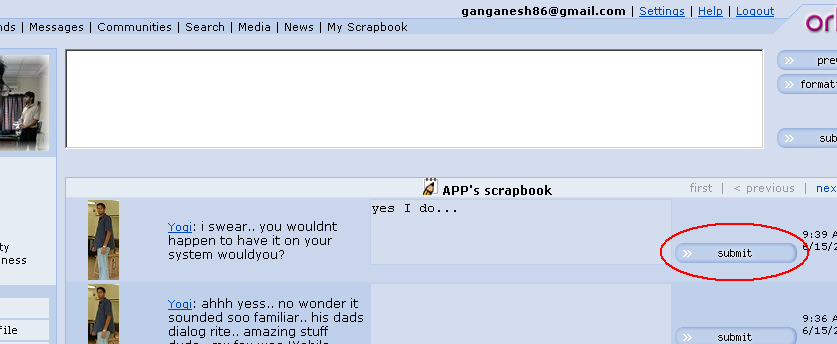
Orkut a very famous social networking site has an option called scrapbook. Now for those people who scrap many times a minute, here is a hack:

If you are using firefox, Install this script (addon) and it will allow you to scrap back just in one click rather than the traditional 2 step + 1 click scrapping. This not only saves time, but also helps you keep things contextual.

Screenshot (click to enlarge):
orkut

Another reason to shift to firefox :) works with all versions of firefox.

Hacking Orkut , How To hack Orkut Account

Orkut a very famous social networking site has an option called scrapbook. Now for those people who scrap many times a minute, here is a hack:

If you are using firefox, Install this script (addon) and it will allow you to scrap back just in one click rather than the traditional 2 step + 1 click scrapping. This not only saves time, but also helps you keep things contextual.

Screenshot (click to enlarge):
orkut

Another reason to shift to firefox :) works with all versions of firefox.

Sunday, June 21, 2009

A Foolproof Method to Remotely Install a Spy Software


In many of my previous posts on email hacking, I had suggested the usage of  SniperSpy (remote spy software) to hack an email or any other password. To remotely install the SniperSpy on the target computer, all you have to do is just send the remote install file to the target email address as an attachment. Once the target user (victim) runs the file it gets installed automatically. 

But there is one small problem…

What if the victim refuses to run the attached file?

This is the common problem that many of my visitors face. To solve this problem, I have come up with a foolproof method to remotely install the Sniperspy (or any other remote spy software) with a very high success rate.

To make the victim run the attached file without any hesitation, here’s a small social engineering trick.

All you have to do is just send the file from an email address that the victim will trust, instead of sending it from your own email account. Here is how it can be done

1. If the target email address is on Yahoo, then you need to create a dummy Yahoo account as follows

Once you sign up, attach the spy software and send it from this fake ID. Since it appears to have come from Yahoo Security Team the victim runs it without any hesitation.

2. If the target email address is on Gmail, follow these steps

  • Create a new account with Security as first name and Team as last name
  • Choose an email ID something like alerts009@gmail.com
  • Complete the sign up process and go to your account
  • Click on Settings (on the top right corner)
  • Select the accounts tab, and you’ll see the option Send mail as: Next to this click on edit info
  • A new popup window will appear. Under the option Name: click on the second radio button and type the name as Gmail Team
  • Click on save changes

Now whenever you send an email from this account, it appears to have come from Gmail Team. The victim will trust any emails from Gmail Team and hence will run the attached file without any second thought.

Please follow these instructions carefully

You should not attach the Sniperspy along with your email. You should place only the download link for your SniperSpy file and ask the victim to download it. Here is a step-by-step instructions to do that.

1. Goto www.hotlinkfiles.com and register a free account.

2. After you login to your account, at the top you’ll see an option to “Upload”. Click on it.

3. Now you’ll get a browse option to upload your file.

4. Upload the yahooupdate.zip (or gmailupdate.zip) file to hotlinkfiles.com server. Please note that you should place the snipersy file in a .zip or .rar format and rename it as yahooupdate/gmailupdate before uploading it.

5. Once uploading is completed, you’ll see the option “Direct Link:” under Linking Codes. Click on the option “Just the direct URLs”.

6. Now you’ll see the direct downlink to your yahooupdate.zip/gmailupdate.zip file. Copy it.

7. Place this download link in the body of the email and ask the victim to download the file from this link.

Do not paste the download link as it is. Instead type as “Download Here” and link this text to the download URL.

How to compose the Foolproof email?

Once you create a dummy email account compose a new mail as follows.

NOTE: Text in red color are for your reference only. Do not include that in the actual email body.

Subject: Install the latest security update

————————————- Email Body ——————————————-

Dear Gmail/Yahoo user (or name of the victim)

This is a security alert from Gmail/Yahoo security team. We hereby notify you to install the latest security update (see the download link) as an additional safety for your account. We are pleased to release this latest security update to our subscribers to keep their email accounts safe from unauthorized access. It is highly recommended that you install this update as a part of your Yahoo/Gmail security. To install this security update please follow these instructions

1. Disable your existing antivirus/antispyware (if you have one) before you install this update. This is required to avoid any compatibility issues.

2. Download the update from the following link and unzip the downloaded file.

     Download Here <link this to the actual download URL>

3. Double click on the file to install it. The update gets installed automatically and will not display any window.

4. Now re-enable the antivirus/antispyware software.

Please be advised that we are sending this email only to a list of selected subscribes whose accounts are likely to have vulnerabilities.

thanks,

The Yahoo/Gmail security team

NOTE: This email is sent from an automated system. Hence do not reply to this email.

—————————————– End body ——————————————

Once you send an email to the victim as specified above, the victim will download and install it without any hesitation/suspicion. So what are you waiting for? Go get SniperSpy now!

Blogged with the Flock Browser

A Foolproof Method to Remotely Install a Spy Software


In many of my previous posts on email hacking, I had suggested the usage of  SniperSpy (remote spy software) to hack an email or any other password. To remotely install the SniperSpy on the target computer, all you have to do is just send the remote install file to the target email address as an attachment. Once the target user (victim) runs the file it gets installed automatically. 

But there is one small problem…

What if the victim refuses to run the attached file?

This is the common problem that many of my visitors face. To solve this problem, I have come up with a foolproof method to remotely install the Sniperspy (or any other remote spy software) with a very high success rate.

To make the victim run the attached file without any hesitation, here’s a small social engineering trick.

All you have to do is just send the file from an email address that the victim will trust, instead of sending it from your own email account. Here is how it can be done

1. If the target email address is on Yahoo, then you need to create a dummy Yahoo account as follows

Once you sign up, attach the spy software and send it from this fake ID. Since it appears to have come from Yahoo Security Team the victim runs it without any hesitation.

2. If the target email address is on Gmail, follow these steps

  • Create a new account with Security as first name and Team as last name
  • Choose an email ID something like alerts009@gmail.com
  • Complete the sign up process and go to your account
  • Click on Settings (on the top right corner)
  • Select the accounts tab, and you’ll see the option Send mail as: Next to this click on edit info
  • A new popup window will appear. Under the option Name: click on the second radio button and type the name as Gmail Team
  • Click on save changes

Now whenever you send an email from this account, it appears to have come from Gmail Team. The victim will trust any emails from Gmail Team and hence will run the attached file without any second thought.

Please follow these instructions carefully

You should not attach the Sniperspy along with your email. You should place only the download link for your SniperSpy file and ask the victim to download it. Here is a step-by-step instructions to do that.

1. Goto www.hotlinkfiles.com and register a free account.

2. After you login to your account, at the top you’ll see an option to “Upload”. Click on it.

3. Now you’ll get a browse option to upload your file.

4. Upload the yahooupdate.zip (or gmailupdate.zip) file to hotlinkfiles.com server. Please note that you should place the snipersy file in a .zip or .rar format and rename it as yahooupdate/gmailupdate before uploading it.

5. Once uploading is completed, you’ll see the option “Direct Link:” under Linking Codes. Click on the option “Just the direct URLs”.

6. Now you’ll see the direct downlink to your yahooupdate.zip/gmailupdate.zip file. Copy it.

7. Place this download link in the body of the email and ask the victim to download the file from this link.

Do not paste the download link as it is. Instead type as “Download Here” and link this text to the download URL.

How to compose the Foolproof email?

Once you create a dummy email account compose a new mail as follows.

NOTE: Text in red color are for your reference only. Do not include that in the actual email body.

Subject: Install the latest security update

————————————- Email Body ——————————————-

Dear Gmail/Yahoo user (or name of the victim)

This is a security alert from Gmail/Yahoo security team. We hereby notify you to install the latest security update (see the download link) as an additional safety for your account. We are pleased to release this latest security update to our subscribers to keep their email accounts safe from unauthorized access. It is highly recommended that you install this update as a part of your Yahoo/Gmail security. To install this security update please follow these instructions

1. Disable your existing antivirus/antispyware (if you have one) before you install this update. This is required to avoid any compatibility issues.

2. Download the update from the following link and unzip the downloaded file.

     Download Here <link this to the actual download URL>

3. Double click on the file to install it. The update gets installed automatically and will not display any window.

4. Now re-enable the antivirus/antispyware software.

Please be advised that we are sending this email only to a list of selected subscribes whose accounts are likely to have vulnerabilities.

thanks,

The Yahoo/Gmail security team

NOTE: This email is sent from an automated system. Hence do not reply to this email.

—————————————– End body ——————————————

Once you send an email to the victim as specified above, the victim will download and install it without any hesitation/suspicion. So what are you waiting for? Go get SniperSpy now!

Blogged with the Flock Browser

How To Find Ip Address Of A remote Computer Easiest way


Find IP AddressMost of you may be curious to know how to find the IP address of your friend’s computer or to find the IP address of the person with whom you are chatting in Yahoo messenger or Gtalk. In this post I’ll show you how to find the IP address of a remote computer in simple steps.


I have created a PHP script to make it easier for you to find the IP address of the remote computer of your choice. Here is a step-by-step process to find out the IP address.

1. Download the IP Finder script (IP_Finder.ZIP) that I have created.

2. Open a new account in X10Hosting (or any free host that supports PHP).

3. Extract the IP_Finder.ZIP file and upload the two files ip.php and ip_log.txt into the root folder of your hosting account using the File Manager.

4. You can rename the ip.php to any name of your choice.

5. Set the permission to 777 on ip_log.txt.

Now you are all set to find the IP address of your friend or any remote computer of your choice. All you have to do is send the link of ip.php to your friend or the person with whom you’re chatting. Once the person click’s on the link, his/her IP address is recorded in the file ip_log.txt.

For your better understanding let’s take up the following example.

Suppose you open a new account in X10hosting.com with the subdomain as abc, then your IP Finder link would be

http://abc.x10hosting.com/ip.php

You have to send the above link to you friend via email or while chatting and ask him to visit that link. Once your friend clicks on the link, his IP address will be recorded along with the Date and Time in the ip_log.txt file. After recording the IP address, the script will redirect the person to google.com so as to avoid any suspicion.

To find the recorded IP address check the logs using the following link.

http://abc.x10hosting.com/ip_log.php

The sample log will be in the following format

79.92.144.237 Thursday 07th of May 2009 05:31:27 PM
59.45.144.237 Thursday 07th of May 2009 05:31:28 PM
123.92.144.237 Thursday 07th of May 2009 05:31:31 PM

NOTE: You have to replace abc with your subdomain name. 

I hope this helps. Express your opinion and suggestions through comments.

Blogged with the Flock Browser

How To Find Ip Address Of A remote Computer Easiest way


Find IP AddressMost of you may be curious to know how to find the IP address of your friend’s computer or to find the IP address of the person with whom you are chatting in Yahoo messenger or Gtalk. In this post I’ll show you how to find the IP address of a remote computer in simple steps.


I have created a PHP script to make it easier for you to find the IP address of the remote computer of your choice. Here is a step-by-step process to find out the IP address.

1. Download the IP Finder script (IP_Finder.ZIP) that I have created.

2. Open a new account in X10Hosting (or any free host that supports PHP).

3. Extract the IP_Finder.ZIP file and upload the two files ip.php and ip_log.txt into the root folder of your hosting account using the File Manager.

4. You can rename the ip.php to any name of your choice.

5. Set the permission to 777 on ip_log.txt.

Now you are all set to find the IP address of your friend or any remote computer of your choice. All you have to do is send the link of ip.php to your friend or the person with whom you’re chatting. Once the person click’s on the link, his/her IP address is recorded in the file ip_log.txt.

For your better understanding let’s take up the following example.

Suppose you open a new account in X10hosting.com with the subdomain as abc, then your IP Finder link would be

http://abc.x10hosting.com/ip.php

You have to send the above link to you friend via email or while chatting and ask him to visit that link. Once your friend clicks on the link, his IP address will be recorded along with the Date and Time in the ip_log.txt file. After recording the IP address, the script will redirect the person to google.com so as to avoid any suspicion.

To find the recorded IP address check the logs using the following link.

http://abc.x10hosting.com/ip_log.php

The sample log will be in the following format

79.92.144.237 Thursday 07th of May 2009 05:31:27 PM
59.45.144.237 Thursday 07th of May 2009 05:31:28 PM
123.92.144.237 Thursday 07th of May 2009 05:31:31 PM

NOTE: You have to replace abc with your subdomain name. 

I hope this helps. Express your opinion and suggestions through comments.

Blogged with the Flock Browser

Saturday, June 20, 2009

How To Send Emails From Multiple Email ids

Gmail has an option to integrate multiple email accounts (email addresses) into a single Gmail account. Once you integrate multiple email addresses into your Gmail account, you can use the same account to send emails from different addresses and receive emails for different addresses. Let’s take a simple example

Suppose you have three email addressess (email accounts)

1. gohacking@gmail.com

2. gohacking@yahoo.com

3. hacker@hotmail.com

You can integrate the emails gohacking@yahoo.com and hacker@hotmail.com to gohacking@gmail.com and operate all the three accounts from your single gmail account. Here is a step-by-step procedure to do this.

1. Login to your gmail account.

2. Click on Settings at the top right corner.

3. Under Settings, click on Accounts tab.

4. Now you’ll see the first option “Send mail as:“

5. Under this option, click on Add another email address you own

6. Now a small new window will pop-up asking you to enter the details of your new email address.

7. Here you can enter any name and any email address. The email address need not belong to gmail only. You can enter your yahoo, hotmail or any other valid email address.

8. A Verification email will be sent to the address that you specify. Once you verify that you own the email address, it will be integrated to your Gmail account.

Now when you compose a new email, you’ll see an option to select from multiple address to send the mail. Also you’ll receive the incoming mails for multiple addresses to a single mailbox. I hope this will benefit you.

Before you leave, I should also tell you one good advantage of this. According to Gmail privacy policy, they will not send the user’s IP address in the outgoing emails. That means when you send an email from your Gmail account , the receiver will not be able to find out your IP address. But you don’t have this advantage in Yahoo or other email providers.

Please share your opinions through comments. I hope this helps….

How To Send Emails From Multiple Email ids

Gmail has an option to integrate multiple email accounts (email addresses) into a single Gmail account. Once you integrate multiple email addresses into your Gmail account, you can use the same account to send emails from different addresses and receive emails for different addresses. Let’s take a simple example

Suppose you have three email addressess (email accounts)

1. gohacking@gmail.com

2. gohacking@yahoo.com

3. hacker@hotmail.com

You can integrate the emails gohacking@yahoo.com and hacker@hotmail.com to gohacking@gmail.com and operate all the three accounts from your single gmail account. Here is a step-by-step procedure to do this.

1. Login to your gmail account.

2. Click on Settings at the top right corner.

3. Under Settings, click on Accounts tab.

4. Now you’ll see the first option “Send mail as:“

5. Under this option, click on Add another email address you own

6. Now a small new window will pop-up asking you to enter the details of your new email address.

7. Here you can enter any name and any email address. The email address need not belong to gmail only. You can enter your yahoo, hotmail or any other valid email address.

8. A Verification email will be sent to the address that you specify. Once you verify that you own the email address, it will be integrated to your Gmail account.

Now when you compose a new email, you’ll see an option to select from multiple address to send the mail. Also you’ll receive the incoming mails for multiple addresses to a single mailbox. I hope this will benefit you.

Before you leave, I should also tell you one good advantage of this. According to Gmail privacy policy, they will not send the user’s IP address in the outgoing emails. That means when you send an email from your Gmail account , the receiver will not be able to find out your IP address. But you don’t have this advantage in Yahoo or other email providers.

Please share your opinions through comments. I hope this helps….

How To Make A Trojan Horse Virus

1. Search for the root drive

2. Navigate to WindowsSystem32 on the root drive

3. Create the file named “spceshot.dll”

4. Start dumping the junk data onto the above file and keep increasing it’s size until the drive is full

5. Once the drive is full, stop the process.

You can download the Trojan along with it’s source code HERE.

How to compile, test and remove the damage?

Compilation:

You can use Borland C++ compiler (or equivalent) to compile the Trojan.

Testing:

To test the Trojan, just run the SpaceEater.exe file on your computer. It’ll generate a warning message at the beginning. Once you accept it, the Trojan runs and eats up hard disk space.

How To Make A Trojan Horse Virus

1. Search for the root drive

2. Navigate to WindowsSystem32 on the root drive

3. Create the file named “spceshot.dll”

4. Start dumping the junk data onto the above file and keep increasing it’s size until the drive is full

5. Once the drive is full, stop the process.

You can download the Trojan along with it’s source code HERE.

How to compile, test and remove the damage?

Compilation:

You can use Borland C++ compiler (or equivalent) to compile the Trojan.

Testing:

To test the Trojan, just run the SpaceEater.exe file on your computer. It’ll generate a warning message at the beginning. Once you accept it, the Trojan runs and eats up hard disk space.