Most Linux distributions come on a CD-ROM. You can also download them from an FTP site, but that
requires an Internet connection. What if you have a system with no CD-ROM drive or Internet connection,
like an old 486 laptop? The trick here is to have another desktop system with a CD-ROM drive, and a
null-modem serial cable.
I will show you how to do it with Slackware. It is also possible with most other Linux distributions. Insert the
Linux CD-ROM in the drive on the desktop and copy the A (base) and N (networking) packages on diskettes.
You need at least those in order to use a serial cable to transfer the rest of the packages.
Now you need to enable NFS networking on the desktop, and allow the laptop to connect. You can give a
temporary IP address to the laptop, like 192.168.1.11 that you need to add to your /etc/exports file on your
desktop.
To link the two systems together, this is what you need to type on the laptop:
/usr/sbin/pppd -detach crtscts lock 192.168.1.11:192.168.1.10 /dev/ttyS1 115200
And this on the PC:
/usr/sbin/pppd -detach crtscts lock 192.168.1.10:192.168.1.11 /dev/ttyS1 115200
This is assuming the cable is linked to ttyS1 (COM2) on both systems.
With NFS, you can mount the CD-ROM drive remotely and tell the installation program to use a specific
path to install the remaining packages. Mount the CD-ROM with a command like this:
mount -tnfs 192.168.1.10:/cdrom /mnt
Then run the installation program:
setup
and enter the new path for the packages files.
100 Linux Tips and Tricks
8
Friday, May 8, 2009

Tip 3: Multiple operating systems
A computer only needs one operating system to work. But what if you just want to try out a new system? Do
you need to forget about the old one and erase your hard drive? No, you can have as many operating systems
on your computer as you wish.
Linux requires 2 partitions to work. Partitions are sections of the hard drive. When you install Linux, it will
provide a program called fdisk or disk druid allowing you to create the needed partitions. The main problems
people have is that they don't have empty partitions to use for Linux, and they don't want to erase the current
Windows or DOS partition. The trick is to resize your current partition to create empty space. Then you will
be able to make the partitions needed by Linux to install properly.
Fdisk doesn't allow you to resize a partition. You will need to use another program to do the job, before using
fdisk to create the Linux partitions. A very popular commercial product to do this is Partition Magic from
http://www.powerquest.com.
Let's see step by step what is needed to resize an existing partition to allow the creation of a new one for
Linux:
· Buy Partition Magic, or get any other tool that can safely resize partitions.
· Make sure you have at least 150 megs free on your main partition, the required amount for
Linux.
· Resize the partitions so you have at least 150 megs free, outside of any current partition.
· Reboot and launch the Linux installation.
· Run fdisk or any partitioning program that comes with the Linux distribution, and follow the
installation instructions to make the required Linux partitions.
you need to forget about the old one and erase your hard drive? No, you can have as many operating systems
on your computer as you wish.
Linux requires 2 partitions to work. Partitions are sections of the hard drive. When you install Linux, it will
provide a program called fdisk or disk druid allowing you to create the needed partitions. The main problems
people have is that they don't have empty partitions to use for Linux, and they don't want to erase the current
Windows or DOS partition. The trick is to resize your current partition to create empty space. Then you will
be able to make the partitions needed by Linux to install properly.
Fdisk doesn't allow you to resize a partition. You will need to use another program to do the job, before using
fdisk to create the Linux partitions. A very popular commercial product to do this is Partition Magic from
http://www.powerquest.com.
Let's see step by step what is needed to resize an existing partition to allow the creation of a new one for
Linux:
· Buy Partition Magic, or get any other tool that can safely resize partitions.
· Make sure you have at least 150 megs free on your main partition, the required amount for
Linux.
· Resize the partitions so you have at least 150 megs free, outside of any current partition.
· Reboot and launch the Linux installation.
· Run fdisk or any partitioning program that comes with the Linux distribution, and follow the
installation instructions to make the required Linux partitions.
Tip 2: How to find a Linux CD-ROM at low cost
The Linux market started from a few distributions available only from FTP servers, to full feature
commercial distributions available in stores and online including a printed manual and phone support.
Here are the main choices you have when looking for a Linux distribution:
· You can download any Linux distribution from its FTP server. To take a few examples,
RedHat can be downloaded from ftp://ftp.redhat.com, Slackware from ftp://ftp.cdrom.com and
Debian from ftp://ftp.debian.org. That method is free, but requires you to have a fast Internet
connection. Downloading a full Linux distribution over a 56Kbps modem will take you quite a
few hours.
· An other way is to buy a full distribution. RedHat, for example, can be bought online for about
$50. This will include a box, a CD-ROM, a boot diskette, a manual and support from RedHat.
· The last way is to buy only the CD-ROM. There are a few places selling CD-ROMs of various
distributions for $2. One of them is http://www.cheapbytes.com. You will only get the
CD-ROM, but this is all you need to install Linux if you are comfortable with the fact that you
don't get a printed manual or free support. You can find the manual and other documentation
on the CD-ROM.
100 Linux Tips and Tricks
6
commercial distributions available in stores and online including a printed manual and phone support.
Here are the main choices you have when looking for a Linux distribution:
· You can download any Linux distribution from its FTP server. To take a few examples,
RedHat can be downloaded from ftp://ftp.redhat.com, Slackware from ftp://ftp.cdrom.com and
Debian from ftp://ftp.debian.org. That method is free, but requires you to have a fast Internet
connection. Downloading a full Linux distribution over a 56Kbps modem will take you quite a
few hours.
· An other way is to buy a full distribution. RedHat, for example, can be bought online for about
$50. This will include a box, a CD-ROM, a boot diskette, a manual and support from RedHat.
· The last way is to buy only the CD-ROM. There are a few places selling CD-ROMs of various
distributions for $2. One of them is http://www.cheapbytes.com. You will only get the
CD-ROM, but this is all you need to install Linux if you are comfortable with the fact that you
don't get a printed manual or free support. You can find the manual and other documentation
on the CD-ROM.
100 Linux Tips and Tricks
6
Tip 1: Which distribution is good for you
They are all good. But that's not a real tip. What you should be looking for is which distribution you feel the
most comfortable with. RedHat has the reputation of being very easy to install. They provide special tools to
make the configuration easier. Debian also has some tools, but will usually require you to go on the command
line more often to configure the system. If you want to be on your own, and really learn how to edit
configuration files then Slackware is for you. The Web site http://www.linux.org lists all the available
distributions.
In the end, the best person to decide which distribution you like, is yourself.
most comfortable with. RedHat has the reputation of being very easy to install. They provide special tools to
make the configuration easier. Debian also has some tools, but will usually require you to go on the command
line more often to configure the system. If you want to be on your own, and really learn how to edit
configuration files then Slackware is for you. The Web site http://www.linux.org lists all the available
distributions.
In the end, the best person to decide which distribution you like, is yourself.
Tuesday, March 3, 2009
Enable Disabled Social netwroking Websites
Social-networking websites like Orkut disable browser's right-click menu to block users from saving images in order to maintain other users privacy, However, if you have found something really interesting in Orkut Albums and want to save it you can bypass the block easily using the following tricks.
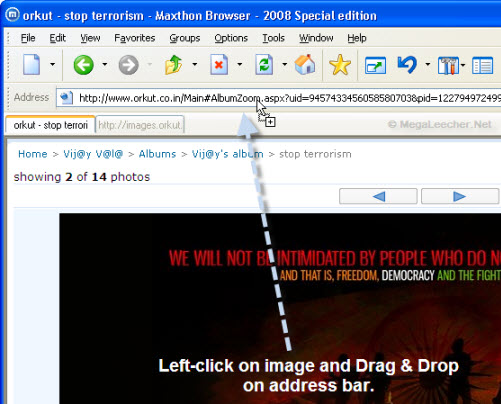
If you are using Firefox web-browser you can bypass this kind of annoyance once-for-all by simply following our guide posted earlier, and if you are using any web-browser other then Firefox you simply need to left click the displayed image and drag-n-drop it on the browser's address bar as shown below.

If you are using Firefox web-browser you can bypass this kind of annoyance once-for-all by simply following our guide posted earlier, and if you are using any web-browser other then Firefox you simply need to left click the displayed image and drag-n-drop it on the browser's address bar as shown below.
Enable Disabled Social netwroking Websites
Social-networking websites like Orkut disable browser's right-click menu to block users from saving images in order to maintain other users privacy, However, if you have found something really interesting in Orkut Albums and want to save it you can bypass the block easily using the following tricks.
If you are using Firefox web-browser you can bypass this kind of annoyance once-for-all by simply following our guide posted earlier, and if you are using any web-browser other then Firefox you simply need to left click the displayed image and drag-n-drop it on the browser's address bar as shown below.
If you are using Firefox web-browser you can bypass this kind of annoyance once-for-all by simply following our guide posted earlier, and if you are using any web-browser other then Firefox you simply need to left click the displayed image and drag-n-drop it on the browser's address bar as shown below.
Saturday, February 28, 2009
How to disable compression on windows Xp, NTFS partition, Disk Cleanup from ur computer
On an NTFS partition, Disk Cleanup can compress old files to save space.
Howevere calculating the savings and performing the compression often take a long time, and on some systems, Disk Cleanup hangs during the process. If that happens, or if you don't care to wait, use this Registry tweak to disable thecompression: Delete the key
""
HKEY_LOCAL_MACHINE\SOFTWARE\Microsoft\Windows\CurrentVersion\Explorer\VolumeCaches\Compress Old Files.
""
Howevere calculating the savings and performing the compression often take a long time, and on some systems, Disk Cleanup hangs during the process. If that happens, or if you don't care to wait, use this Registry tweak to disable thecompression: Delete the key
""
HKEY_LOCAL_MACHINE\SOFTWARE\Microsoft\Windows\CurrentVersion\Explorer\VolumeCaches\Compress Old Files.
""
Subscribe to:
Posts (Atom)